Content365BlogSocial media strategy
Local SEO and social media: how daily posts help customers in your city find you
Local SEO for small business, explained simply: how Google Business Profile posts, near me searches and steady social posts help people in your city find you.

A family in your area needs a blood test before a doctor's appointment tomorrow morning. Someone picks up a phone and types "lab near me". A map appears with a few names. One has old photos, timings that say "may be closed" and no updates since last year. Another has recent posts about home sample collection, clear Sunday hours and a picture of the actual reception. Guess which one gets the call.
That small moment is what local SEO for small business is really about. It is not a technical mystery. It is whether a person in your city, searching on their phone, sees enough to trust you in the few seconds they give each result. This guide explains how your Google Business Profile, your social media and a steady posting habit work together, and gives you a plan you can follow even if you never hire anyone.
What local SEO for small business actually means
Search engines try to show people the most useful nearby options. For a local business, being found depends on a mix of things you control and things you do not. Nobody outside the search companies knows the exact formula, and anyone who promises you a guaranteed top spot is guessing.
What is widely understood is simpler. Search engines generally look at:
- Relevance: does your listing clearly say what you do and match what the person searched?
- Distance: how close you are to the person or to the area they named.
- Prominence: how well known and active your business looks across the web, including reviews, mentions and your own pages.
You cannot move your shop closer to every customer. You can make your listing complete and accurate, and you can show, again and again, that you are open, active and good at what you do. That is where daily posting quietly helps.
Google Business Profile posts: the most overlooked free tool
Google Business Profile is the free listing that shows your business on Google Search and Maps. Besides your address, phone and timings, it lets you add posts: updates, offers and events with a picture and a short text. Many local businesses set up the profile once and never touch it again.
That is a missed chance. Google Business Profile posts appear on your listing, right where a customer is deciding. They are a simple way to show that someone is actually running the place.
Good things to post there:
| Post type | Example for a diagnostic lab | Example for a shop |
|---|---|---|
| Update | New Sunday morning collection hours | New stock of winter wear arrived |
| Offer | Health check package for the festival week | Weekend combo on staples |
| Event | Free blood pressure camp at the centre | Opening of the second outlet |
| Reminder | Fasting tips before a lipid profile test | Last day of the season sale |
| Trust | Photo of the team and the clean waiting area | Photo of the owner at the counter |
Keep every post honest. Do not add ratings, awards or claims you cannot back up. And keep the basics right: your name, address and phone should be written exactly the same way on your profile, your website and your social pages.
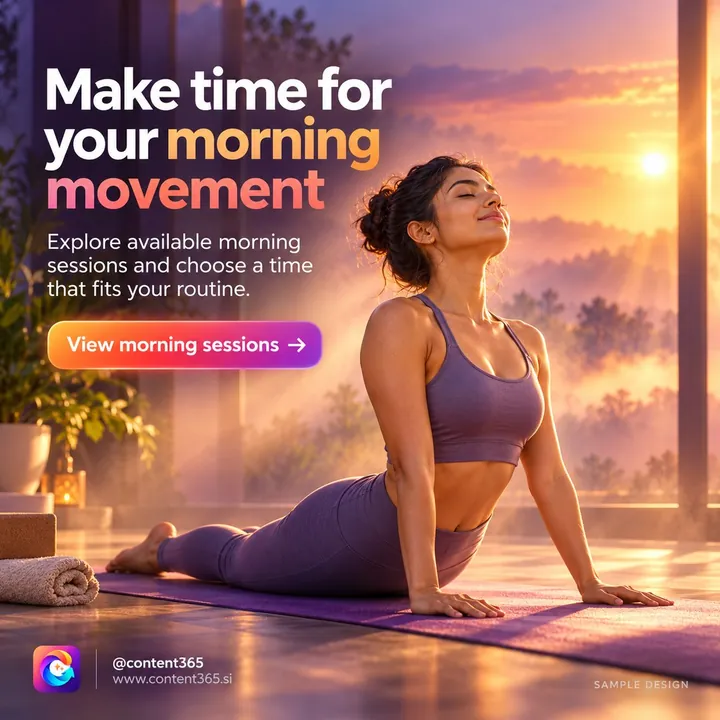
This sample design for a made-up yoga studio is not a lab post, but the same kind of update works for a lab on a Google Business Profile as well as on Instagram: one clear service, the lab's own name and contact details, and a reason to call.
How social media supports near me searches
Your Instagram or Facebook page is not your Google listing, and posting there is not a magic switch for Maps. But social media helps local search in practical, everyday ways.
- People check you twice. Many customers see you on Maps, then look you up on Instagram before they call. A page with recent posts confirms you are real and active.
- Your name gets around. When posts are shared on WhatsApp or tagged by a customer, more people in your area learn your name. Some of them search for it directly later.
- The same pictures work everywhere. A post made for Instagram can be added to your Google Business Profile, your WhatsApp Status and your Facebook page. One good picture, four places.
- Questions turn into content. The questions people ask in comments are exactly what others type into near me searches: "open on Sunday?", "home visit?", "parking?" Answer them in posts.
For more on the WhatsApp side, read our guide to WhatsApp Status marketing.
City based marketing: make your posts unmistakably local
Generic posts could belong to any business in any city. City based marketing means putting your place into the content, so both people and search engines can tell where you are.
Ideas that work in almost any town:
- Name the area. "Now collecting samples in Arera Colony and MP Nagar" says more than "home collection available".
- Local festivals and seasons. The monsoon in your city, a local fair, a regional new year, a big cricket match day.
- Landmarks as directions. "Opposite the main post office, first floor" helps a new customer and keeps your address consistent.
- Your team and your street. Real photos of the people and the shopfront, posted now and then.
- Local language. A caption in Hindi or your regional language often feels more like home to local customers. Our guide on Hindi captions for business explains how to do it well.
Good local marketing in India follows the same rule: it does not need a big budget. It needs regularity and a little attention to the place you serve.
A weekly local visibility routine
Here is a routine that takes under an hour a week once your posts are ready.
| Day | Task | Time |
|---|---|---|
| Monday | Post on Instagram and Facebook; share to WhatsApp Status | 10 minutes |
| Tuesday | Add one post to your Google Business Profile | 5 minutes |
| Wednesday | Reply to every new review, good or bad, politely | 10 minutes |
| Thursday | Post a local or service-focused picture | 10 minutes |
| Friday | Check timings, holiday hours and phone on your profile | 5 minutes |
| Saturday | Post a weekend update or offer | 10 minutes |
| Sunday | Plan next week; note any local event or festival | 10 minutes |
This routine is the everyday side of local SEO for small business. A few rules sit on top of it. Never buy or invent reviews. Never write fake ratings on posts. Ask happy customers to leave an honest review if they wish, and leave it at that. We explain why in honest marketing on social media.

Where most local businesses go wrong
- Different details everywhere. An old phone number on Facebook, a new one on Google, a third on the shop board. Fix them all on the same day.
- Timings that lie. Holiday closures not updated, so customers arrive to a locked shutter. Few things damage local trust faster.
- A burst then silence. Ten posts in the opening week and none after. An active listing is one that stays active.
- Posts with no place. Nothing in the picture or caption says which city you are in.
- Over-claiming. "Best lab in the city" with nothing behind it. Let your work and honest reviews speak.
How Content365 keeps your local presence steady
The hardest part of local SEO for small business owners is not the listing or the routine above. It is having a ready, branded picture and caption every single day. Content365 makes a full year of them for your business.
- 365 posts, one for every day. For one brand it is ₹3,999 including GST for the year, not per month. See pricing, or check what each extra brand costs if you run more than one outlet.
- Your details, spelt right, on every post. An image model paints a scene with no text in it, and the compositor then places your real logo, business name, phone, website and call to action on top, from the exact text you gave. That means the same contact details on every picture, which is exactly what local customers need.
- One image for every place you post. Each post is one 1080 x 1350 (4:5) image with a square-safe centre, ready for Instagram, Facebook, LinkedIn, X and WhatsApp, and easy to add to your Google Business Profile too.
- Captions in five forms. Instagram, Facebook, LinkedIn and X, plus Hindi, for every day.
- Local and national dates already planned. Indian festivals and the financial year are placed in the calendar on the days they fall.
- No made-up claims. Ratings, testimonials, awards and statistics appear only when you confirmed them.
You review every day in your gallery first. We do not post on your pages or your Google listing; you or your team post them, so the profile stays yours. Want to try it before paying? The free plan gives you 2 posts for your brand every 48 hours, no payment needed. Start free with Google, or browse the sample library by industry.
Frequently asked questions
Do social media posts improve my Google Maps ranking?
Nobody can promise that, because search engines do not publish their exact methods. What is generally true is that a complete, accurate and active presence helps people trust and choose you, and steady posts are part of looking active.
How often should I add Google Business Profile posts?
Once a week is a sensible habit for most small businesses. Post more when you have a real update, such as new timings, an offer or an event.
What size picture should I use for my Google Business Profile?
Use a clear, well-lit picture where the main subject sits in the middle. A 4:5 image with a square-safe centre works well because the important part survives when a platform crops it.
Can I use the same post on Instagram and my Google listing?
Yes. One good picture with a caption adjusted for each place saves time and keeps your message consistent everywhere a local customer may look.
Will Content365 manage my Google Business Profile?
No. Content365 gives you a year of finished posts and captions. You or your team add them to your profile and pages, and you keep full control of every account.
Be the active name on the map
Local customers choose the business that looks open, real and nearby. A year of ready posts makes that easy to keep up. See what you get with the yearly plan and give your city a reason to find you.