Content365BlogSocial media strategy
Google Business Profile posts: what to post every week to get found in your city
Google Business Profile posts made simple: a weekly plan, update ideas by business type and the mistakes to avoid, so people searching near you see an active business.
A patient's tooth starts aching on a Sunday evening. She picks up her phone and types "dentist near me". Three clinics appear on the map. One has a photo from four years ago and no updates. One has reviews but nothing else. The third has a post from this week about Sunday emergency timings, with a clear picture and a call button. You can guess which one she calls.
That third clinic is not paying for anything special. It is using Google Business Profile posts, the free updates you can add to your listing on Google Search and Maps. Most small businesses in India set up their profile once, add a few photos, and never touch it again. This guide explains what these posts are, what to post every week, and how to keep it going without it becoming one more job you dread.
What Google Business Profile posts are, and what they are not
Your Google Business Profile is the listing that shows your name, address, phone, timings, photos and reviews when someone finds you on Google Search or Maps. Many owners still call it Google My Business, which was its older name, so if you have heard of Google My Business posts, they are the same thing.
On that profile you can add posts: a short update with a picture, some text and often a button such as Call, Book or Learn more. Google offers a few broad kinds, mainly updates (general news), offers (a deal with a validity period) and events (something on a particular day). The exact options and how they display change from time to time, so look at what your own profile manager shows today.
What posts are not: they are not ads, and they are not a guaranteed way to rank higher. Google does not publish a promise that posting moves you up the map, and anyone who tells you otherwise is guessing. What posts clearly do is make your listing look alive and give a searcher a reason to choose you once they see you.
Why local search posts matter more than you think
When people search with words like "near me", "in my area" or the name of their locality, they usually want to act soon: call, visit, book, order. That is a different mood from scrolling Instagram.
This makes local search posts unusual. The person reading your post is often already close to a decision. You do not need to entertain them. You need to answer their quiet questions:
- Are you open right now, and on Sunday?
- Do you do the thing I need?
- What does a visit look like?
- How do I contact you?
A post that answers even one of these helps. A listing with no posts leaves them to guess, and a guessing customer usually picks someone else.
For the bigger picture of how your Google listing, reviews and social pages work together, read our guide to local SEO and social media. This guide focuses only on the weekly posting habit.
A weekly plan for Google Business Profile posts
You do not need to post every day on Google. A steady weekly rhythm is realistic for most owners and keeps your listing current. Here is a plan built around four post types that rotate through the month.
| Week | Post type | Example for a dental clinic | Example for a shop or café |
|---|---|---|---|
| Week 1 | A service in focus | "Teeth cleaning: what happens in a 30-minute visit" | "Our weekend thali, served noon to four" |
| Week 2 | Timings or practical update | "Open Sunday mornings for emergencies" | "Home delivery now up to 3 km" |
| Week 3 | A helpful tip or answer | "Why gums bleed when you brush, and when to see a dentist" | "How to store basmati in the monsoon" |
| Week 4 | Offer or event, if you have one | "Free check-up camp at the clinic this month" | "Festival gift boxes now in stock" |
If you have more time, add a second post in the week, usually a photo of your space or team. If you have less, keep weeks one and two, because those two answer the most common searcher questions.
A few habits that make the plan stick:
- Pick one day. Monday morning before opening, or Saturday after closing. The same day every week.
- Keep the button useful. Call for a clinic, Order or Call for a restaurant, Directions for a shop.
- Update timings before holidays. Change your listed hours for Diwali, Holi or a local festival as well as posting about it. Many people check timings on Google first.
GBP update ideas by business type
If you are stuck for GBP update ideas, start with these. Each one answers something a nearby customer actually wonders about.
Clinics and dental practices
- What a first visit looks like, step by step
- Which days have specialist availability
- Simple, general care tips (always pointing to a check-up for anything specific)
- Your safety and cleaning routine between patients
- A new treatment you now offer, explained in plain words
Restaurants and cafés
- This week's special or seasonal dish
- Family or group seating, private room, parking
- Delivery area and how to order
- Festival menus and timings
Shops and showrooms
- New stock or a new brand you now carry
- Bulk or wholesale options for local businesses
- Exchange or repair services
- Festival timings and offers with clear end dates
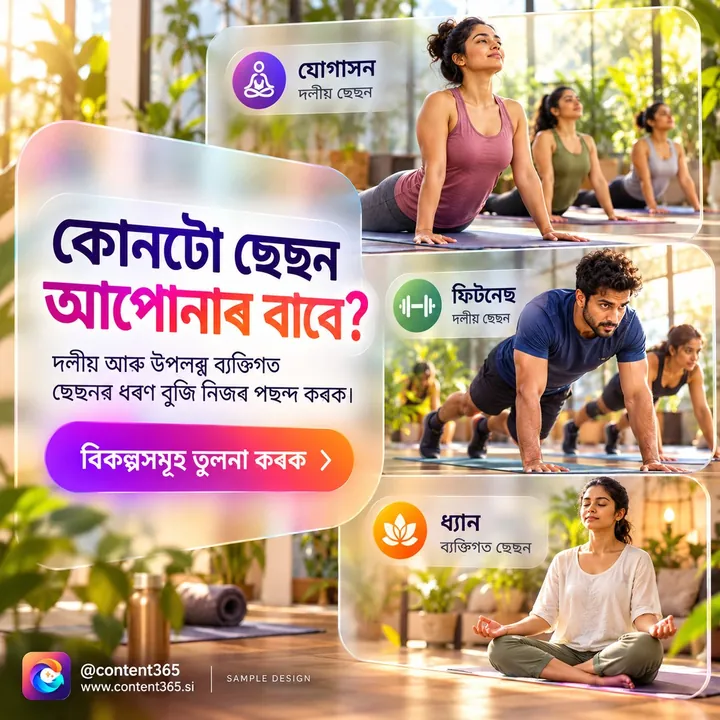
This sample design for a made-up yoga and fitness studio shows how a question-answer post works: the headline invites the reader in, and the caption answers one common worry. You can use the same picture on Instagram, Facebook and your Google listing.
For more ideas specific to clinics, see dental clinic social media ideas and social media posts for medical clinics.
Writing posts that help near me visibility
You cannot control exactly where Google shows you. You can make sure that when you do appear, everything about your listing helps a nearby person choose you. Good near me visibility is as much about being chosen as about being shown.
Mention your area in plain words. "Our Jayanagar clinic is open on Sunday mornings" tells the reader they are in the right place. Do not stuff a list of area names; one natural mention is enough.
Lead with the useful part. On a phone, only the first line or two may show before the reader taps. Put the answer first: "Open Sunday 9 to 1 for dental emergencies."
Use a real, clear picture. A bright, uncluttered image reads well in the small box on Maps. Pictures may be cropped in some views, so keep the important part in the centre.
Keep the text short. A few sentences is enough. Long paragraphs belong on your website.
Never put a fake offer or fake review in a post. If you mention a rating or award, it should be one you genuinely have. Our post on honest marketing and fake reviews explains why this matters for small businesses.
Stay within Google's content rules. Google has rules about what posts may contain, and posts that break them can be removed. In general: nothing misleading, nothing offensive and nothing off-topic for your business. Read the current guidelines in your profile help pages.
Keeping the rest of the profile in shape
Posts work best on a profile that is complete and correct. Once a month, spend ten minutes on these checks:
- Name, address and phone match your shop board and website. Small differences confuse customers.
- Timings are right, including special hours for festivals and holidays.
- Categories describe what you do. A dental clinic should not be listed only as "clinic".
- Photos are recent. Add a new photo of the shop front, waiting area or team every few months.
- Reviews have replies. A short, polite reply to each review, good or bad, shows you are listening. Never offer gifts for reviews.

How Content365 gives you a picture for every post
The reason most Google listings go quiet is simple: there is no picture ready on Monday morning. Content365 solves that part.
For ₹3,999 including GST, you get 365 branded posts for one brand, one for every day of the year. It is a single payment for the full year, and every extra brand is the same ₹3,999 including GST. See pricing for the details.
- Pictures that fit everywhere. Each post is one 1080 x 1350 (4:5) image with a square-safe centre, ready for Instagram, Facebook, LinkedIn, X and WhatsApp. That centre also helps when your Google listing shows a cropped view.
- Your real details in place. An image model paints a scene with no text in it, and the studio's compositor places your real logo, business name, phone, website and call to action on top from the exact text you gave. The logo is never redrawn by the model.
- Captions ready to trim. Captions come for Instagram, Facebook, LinkedIn and X, plus one in your own language (Hindi, Tamil, Bengali and 9 more). The Facebook or LinkedIn caption is usually a good starting point for a short Google post.
- Festivals planned. Indian festivals and the financial year are in the calendar on the days they fall, so you can post the festival timing update on time.
- Honest claims only. Ratings, testimonials, awards and statistics appear only when the brand confirmed them.
You review every day in your own gallery first. We do not post on your pages or manage your Google listing: you pick one post a week (or more) and add it yourself. Everything also comes in one download folder with all pictures, captions.csv, prompts.csv, calendar.csv and a gallery that opens on any phone.
Try it with no payment: the free plan gives 2 posts for your brand every 48 hours. Sign in with Google to start free, then compare it with the full-year plan.
Frequently asked questions
How often should I add Google Business Profile posts?
Once a week is a realistic, steady rhythm for most small businesses. Add an extra post around festivals, holidays or when your timings change. Steady and current matters more than a burst followed by months of silence.
Are Google My Business posts the same as Google Business Profile posts?
Yes. Google My Business was the older name. The updates you add to your listing on Google Search and Maps are the same thing, whichever name you use.
Will posting on Google improve my ranking?
Google does not promise that. Posts make your listing look active and give searchers a reason to choose you once they see you. A complete profile, correct details, real reviews and a relevant category all matter too.
Can I use my Instagram pictures on my Google listing?
Yes, as long as the picture is yours and clear at small sizes. Shorten the caption, lead with the practical information and keep the important part of the picture in the centre.
What should a clinic avoid in Google posts?
Avoid promises of results, comparisons with other clinics and specific medical advice. Keep tips general, encourage a consultation, and follow both Google's content rules and the rules for your profession.
Does Content365 post on my Google Business Profile?
No. Content365 gives you a branded picture and captions for every day. You review them in your gallery and add the ones you choose to your Google listing yourself.
Be the clinic or shop that looks open
A weekly Google Business Profile post takes a few minutes once the picture is ready. Make the picture the easy part: get a full year of branded posts for ₹3,999 including GST.