Content365BlogSocial media strategy
Facebook page for a local business in India: set it up right and keep it active
Facebook page for local business owners in India: how to set it up properly, what to post each week, ideas for shops and services, and how to keep it active all year.
Your nephew made the page three years ago. He uploaded the shop photo, invited the family, posted "Grand opening" with a garland picture, and then went back to college. Since then the page has sat there with the old phone number, the old timings and a profile picture that is slightly blurry. Every few weeks someone comments "Is this shop still open?" and nobody answers.
A Facebook page for local business owners in India is still one of the simplest ways to be found by the families, office workers and older customers in your area, many of whom use Facebook more than Instagram. But a forgotten page can do more harm than no page at all, because it tells people you might have closed. This guide shows you how to set the page up properly in one sitting, and then how to keep it active with a plan that fits a busy week.
Why a Facebook page for local business still matters
Many owners assume Facebook is only for older relatives now. In many Indian towns and cities, that is exactly why it matters. Parents, grandparents, shop owners, office staff and local community groups are often active there, and they are the people who buy groceries, book clinic visits, order sweets for a function and recommend a good tailor to their friends.
A page also does quiet work you do not see:
- People check it before visiting. A customer who hears your name from a neighbour often looks you up. A page with recent posts and correct timings reassures them.
- It links to WhatsApp and calls. A page can show a button to call, message or WhatsApp you, so the step from "I saw your post" to "I placed an order" is short.
- Local groups share it. Colony groups, school parent groups and community pages often share local businesses when someone asks for a recommendation.
Local business Facebook marketing is not about going viral. It is about looking open, trustworthy and easy to contact to the people within a few kilometres of you.
Set up your Facebook page for local business in one sitting
If you have a page already, use this as a checklist. If you do not, create one from your personal Facebook account; you remain the admin, but the page is separate from your personal profile.
| Part of the page | What to put | Common mistake |
|---|---|---|
| Page name | Your business name as on the board, with the area if it helps: "Annapurna Kirana Store, Vijay Nagar" | Adding "Best" or "No. 1" to the name |
| Category | The closest match: grocery store, dental clinic, restaurant | A vague category like "local business" only |
| Profile picture | Your logo, clear on a plain background | A blurry photo of the shop front cut off in the circle |
| Cover image | Your shop front, team or best product, with your name visible | A random stock picture |
| Contact details | Phone, WhatsApp, address, map pin, website if you have one | An old number nobody answers |
| Hours | Real opening hours, updated for festivals | Hours left blank |
| About / intro | Two or three lines: what you sell, where, and one reason to choose you | A long paragraph of keywords |
| Action button | Call, WhatsApp or Send message | No button, or one that goes nowhere |
Two more things are worth doing on day one. First, add a second admin you trust, so you never lose access if one account has trouble. Second, turn on message notifications on your phone, or at least check messages once a day. A customer who writes "Do you deliver to Sector 5?" and hears nothing for a week will not ask again.
Facebook business page tips that keep you looking active
Once the page is set up, a few simple habits matter more than any clever trick.
Post on a rhythm you can keep. Three or four posts a week, every week, looks far more alive than ten posts in one week and then silence. If daily posting is realistic for you, wonderful, but steady comes first.
Answer every comment and message. Even a short "Yes, we are open till 9 tonight" builds trust.
Keep one message per post. A picture with one clear headline is easier to read on a small phone screen than a crowded flyer.
Make your phone number travel with the picture. People share and screenshot posts. If your name and number are on the image, they go along.
Be honest with offers. Give the end date, the conditions and what is included. A clear offer earns more trust than a large one with hidden rules.
Facebook posts for a shop: a simple weekly plan
Here is a week of Facebook posts for a shop that you can adapt for almost any local business. Swap in your own products or services.
| Day | Post idea | Example line |
|---|---|---|
| Monday | What is new this week | "New stock of hand-pounded spices is in" |
| Tuesday | A product or service in focus | "Our cold-pressed groundnut oil, in 1 and 5 litre packs" |
| Wednesday | A useful tip | "How to keep atta fresh in the monsoon" |
| Thursday | Delivery, timings or how to order | "Order on WhatsApp before 11 for same-day delivery" |
| Friday | Behind the counter | "Meet Ramesh bhaiya, who has packed your orders for years" (with his permission) |
| Saturday | Weekend need | "Snacks and cold drinks for the weekend, all in one place" |
| Sunday | Greeting, thank-you or community news | "Thank you, Vijay Nagar, for another good week" |
If seven posts are too many, keep Monday, Thursday and Sunday. Those three cover what is new, how to buy and a warm local touch.
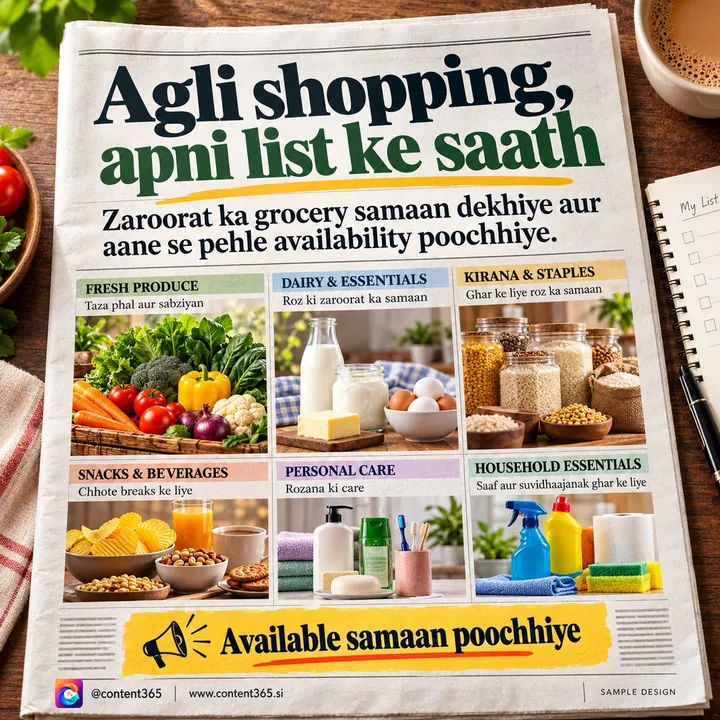
The same picture can go on your WhatsApp Status and Instagram on the same day. Our guide to WhatsApp Status marketing for business shows how to use Status alongside your page.
Facebook page ideas for different local businesses
If you need fresh Facebook page ideas, start with the questions customers ask you at the counter. Every repeated question is a post.
Grocery and general stores: pack sizes, festival stock, delivery area, household and cleaning essentials before festivals, season items such as til and gur in January.
Clinics and pharmacies: timings, which doctor is available which day, general health awareness days, how to book, home delivery of medicines. Keep health posts general and encourage people to consult a doctor.
Restaurants and sweet shops: today's special, festival boxes and pre-order dates, party and catering orders, a peek into the kitchen.
Salons and boutiques: new looks, bridal season bookings, festival offers with dates, before-and-after work (with the customer's permission).
Coaching and schools: batch timings, admission windows, study tips, results only if they are real and the student and parents have agreed. Never post identifiable photos of children without written parental consent.
For a broader view of which platforms suit which business, see our guide to social media for small business in India.
Festivals, events and the yearly rhythm
Festivals are when local pages come alive. People look for timings, gift ideas, sweets, decoration and offers. Plan these into your Facebook calendar ahead of time.
- Fixed dates: New Year (1 January), Makar Sankranti (usually 14 January), Republic Day (usually 26 January), Independence Day (usually 15 August), Christmas (25 December), and the new financial year from 1 April for businesses that sell to other businesses.
- Festivals whose date moves: Holi (usually February or March), Raksha Bandhan (usually August), Ganesh Chaturthi and Navratri (usually August to October), Diwali (October or November), Eid. Check this year's date before you post.
- Your own events: shop anniversary, a new branch, a new service, a free check-up camp.
Post a few days before a festival about stock and timings, and on the day with a simple greeting. Change your listed hours on the page too.

Why pages go quiet, and how to stop it
Most local pages do not fail because of a bad post. They fail because posting stops. The owner gets busy, the person who helped leaves, a festival rush takes over, and three months pass. We wrote a whole post on why businesses stop posting, but the short version is that the daily decision of "what do I post today?" wears people out.
Ways to keep going:
- Batch your posts. Prepare a week or a month at once, then post in a minute each day.
- Share the job. One person makes the posts, another posts and answers messages.
- Keep a backup list. Ten evergreen posts (timings, delivery, your story, your best product) you can use on a busy day.
How Content365 keeps your Facebook page full
Content365 makes 365 branded posts for your business, one for every day of the year, for ₹3,999 including GST. That is one payment for the whole year, not a monthly charge, and each extra brand is also ₹3,999 including GST. See pricing.
- A ready picture for every day. Each post is a 1080 x 1350 (4:5) image with a square-safe centre, ready for Facebook, Instagram, LinkedIn, X and WhatsApp.
- Your real logo, name and number. An image model paints a scene with no text, and the compositor then places your real logo, business name, phone, website and call to action from the exact text you gave. The logo is never redrawn by the model.
- A Facebook caption every day. Captions are written for Facebook, Instagram, LinkedIn and X, plus one in your own language (Hindi, Tamil, Bengali and 9 more), so you can post in the language your customers prefer.
- Festivals already in place. Indian festivals and the financial year are planned into the calendar on the days they fall.
- Not one template repeated. 365 angles across 5 lenses give 1,825 concepts in 21 angle families, mixed through the year. Near-duplicate pictures are rejected.
You review every day in your own gallery first. We do not post on your pages: you or your team post them and answer the comments. You also get one download folder with all pictures, captions.csv, prompts.csv, calendar.csv and a gallery that opens on any phone.

Try it before paying: the free plan gives 2 posts for your brand every 48 hours. Start free with Google. When the page is ready for a full year, see the yearly plan for one brand.
Frequently asked questions
Do I need a Facebook page if I already use WhatsApp?
They do different jobs. WhatsApp reaches people who already have your number. A Facebook page helps new people in your area find you, check your timings and see that you are active. The same picture can go on both.
How often should a local business post on Facebook?
Three or four times a week is a good, steady start for most local businesses. Daily is great if you can keep it up. What matters most is not stopping for weeks at a time.
Should I use my personal profile or a business page?
Use a page. It keeps your business separate from your family photos, shows business details like timings and an action button, and can have more than one admin.
What should I do with an old page that has the wrong details?
If you can still access it, update the name, phone, hours, profile picture and cover, then start posting again. If nobody can access it, follow Facebook's help pages to recover it, rather than creating a confusing second page.
Can I post the same picture on Facebook and Instagram?
Yes. A 4:5 picture works well on both. Adjust the caption a little for each, and keep your name and number on the picture itself.
Does Content365 manage my Facebook page?
No. Content365 gives you a branded picture and captions for every day. You review them and post them on your page yourself, and you stay in charge of replies and messages.
Make your page look open every day
A good Facebook page for a local business is simple: correct details, a steady rhythm, honest posts and quick replies. If you want the posts ready for the whole year, get 365 days for ₹3,999 including GST.