Content365BlogInside Content365
AI for small business in India, in plain words: what it does and what you never have to learn
AI for small business India, without the jargon: what Content365's AI does for a chemist or shop owner, what it never touches, and the little you must do.
You run a chemist shop. Your day is prescriptions to read, refills to remember, strips to count and a delivery boy waiting for the next address. Somewhere on the news you keep hearing about AI. Then a relative tells you to "just use AI" for the shop's posts: open a chatbot, type a prompt, pick a tool. It sounds less like help and more like a new subject to study at night.
If that is how AI for small business India has felt to you so far, you are not behind. You are busy. This post explains, in plain words, what the AI inside Content365 actually does, what it is never allowed to touch, and the small part left for you, which involves no prompts and no new skill.
Made by AI engineers, for people who are not
Content365 was built by people who know AI well. Its founder, Divyaprakash Jha (Founder & CEO), has spent a decade working with Vaibhav Jain, Vikas Jha and Zeeshan Khan, who make up the core team. Together they moved from Python software to machine learning to AI, on systems for commercial clients.
A team like that could easily have made a tool for other techies, crowded with settings and options. They went the other way, because the businesses that most need a daily post are the ones with the least time to learn software.
"The people who need this most are not the tech crowd. They are busy running a shop, a clinic or a school, and they deserve the same quality that big brands get," the founder says.
So the rule became simple. The AI does its work out of sight, and the owner never has to deal with it directly.
It helps to see why the usual advice, "just use a chatbot", so often fails a shop owner:
- You have to know what to ask. A chatbot waits for instructions, and writing good ones is a skill of its own.
- Every day starts from zero. Yesterday's prompt does not plan tomorrow's festival.
- Words inside pictures often come out wrong. Many image tools mangle letters, so your shop's name or number may be misspelt.
- The fixing is still yours. Cropping, retyping the phone number and adding the logo all land back on your evening.
Content365 is designed so that none of these four lands on you.
AI in plain words: a short glossary for owners
You will hear these words around any AI tool. You do not need them to use Content365, but if someone throws them at you, here is what they mean.
| Word | What it means | Where it shows up in Content365 |
|---|---|---|
| AI | Software that can make pictures or words from a description | It makes your year of posts in the background |
| Prompt | The instruction you type into an AI tool | You never write one; you describe your business once |
| Image model | The part of AI that paints a picture | It paints a scene for each day, with no words in it |
| Vision model | AI that looks at a picture and spots problems | It checks every picture for stray text, with up to three tries a day |
| Compositor | The step that puts your logo and words on the picture | It places your real logo, name, phone, website and call to action exactly as you typed them |
| Caption | The words that go with the picture when you post | Every day has one caption each for Instagram, Facebook, LinkedIn and X, and one in Hindi |
| Near-duplicate | A picture too similar to one already used | It is rejected, so your year does not repeat itself |
That is the whole vocabulary. Once your year is made, none of these words needs to come up again. And if anyone tells you that you must learn prompts to get good posts, you now know enough to ask why.
What AI can do for your shop, and what it must never do
AI is good at some jobs and bad at others. A sensible tool uses it only for the jobs it is good at.
| AI is good at | AI should never be trusted with |
|---|---|
| Painting a fresh, attractive scene every day | Writing your shop's name or phone number inside the picture |
| Drafting captions in English and Hindi | Redrawing your logo |
| Planning a full year with festivals in place | Inventing ratings, reviews or awards |
| Checking pictures for stray text | Reading your private contact details |
| Keeping 365 days varied | Posting on your page without you |
Content365 is built along exactly that line. The image model paints only the scene; the compositor then adds your real logo and details on top, and no model ever redraws that logo. A rating, testimonial, award or statistic is used only when you have confirmed it. Before any model reads what you wrote about your business, your phone number, e-mail address and WhatsApp link are taken out of the text. And nothing is posted for you: Content365 does not post on your pages.
A word for pharmacies and other health businesses in particular. Keep your posts general: timings, home delivery, new stock of everyday essentials, seasonal awareness. Leave anything about a customer's own health to their doctor or pharmacist. You look at every post before it goes out, so the final word is always yours. Our pharmacy social media marketing guide has a full list of safe, useful post ideas for chemist shops.
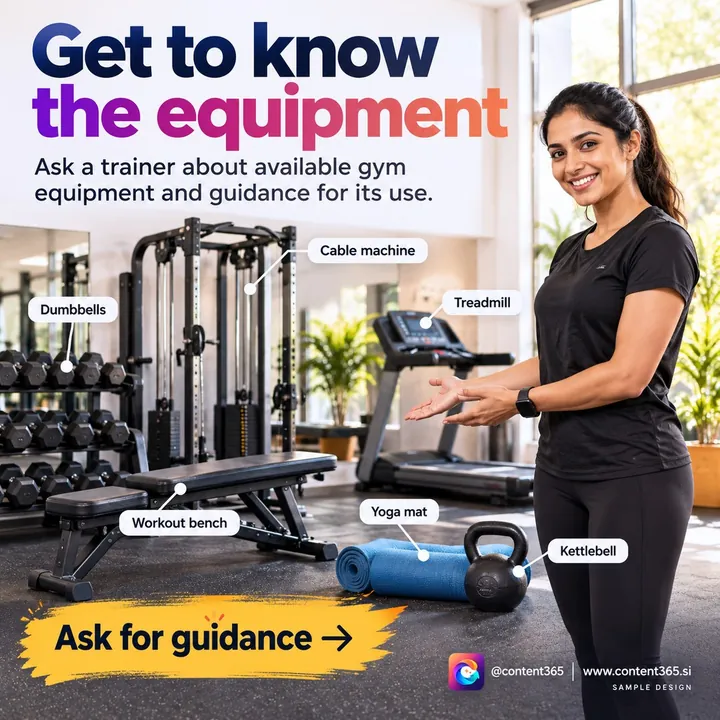
This is a sample design from our sample library, made for a made-up business, not a real customer.
The small part that is left for you
Here is everything you do, from the first day to the last. No step asks you to understand AI.
- Sign in with Google. That is the whole sign-up.
- Tell Content365 about your business once. Your name, your kind of business, your logo, plus a website if there is one.
- Look at the free posts. On the free plan you get 2 posts for your brand every 48 hours, with nothing to pay, so you see your own logo on real posts first.
- Take the year when you are ready. The studio then makes all 365 days, with Indian festivals and the financial year planned on the days they fall.
- Each morning, look and post. Content365 runs on the web and on Android, with a reminder at 9 am. Open the day's post, read the caption, and share it on Instagram, Facebook, WhatsApp or wherever your customers are.
Each picture is 1080 x 1350 (4:5) with a square-safe centre, so the same file fits every platform. You can also download the whole year as a single folder of pictures, caption files and the calendar, and its gallery works on any phone. Because every day carries a Hindi caption as well as the English ones, you can talk to Hindi-speaking customers in their own language.
A practical tip for the first month: choose the one platform where most of your customers already are, such as WhatsApp Status or Instagram, and post there every day before you add a second one.
If keeping the habit is the hard part, our guide on why businesses stop posting after three weeks has simple ways to keep going.
"Making a good post every day is not a big deal for AI techies. We built Content365 so that it is not a big deal for the shop owner either," says Divyaprakash Jha.
What it costs to let the AI do the work
For one brand, a full year on the yearly plan costs ₹3,999 including GST, roughly ₹11 a day. There is no monthly bill, so it is one decision for the year rather than twelve. A second brand is the same ₹3,999 including GST again. Agencies and freelancers often charge several thousand rupees a month for this kind of help, more than many chemist shops can set aside for posts.
Hosting of your gallery runs for 90 days after payment. From then on it is ₹3,000 a year before GST, or you simply work from the folder you saved. See pricing for the details, or browse finished posts for 25 industries in the sample library.

Frequently asked questions
Is any AI knowledge needed to use Content365?
Not at all. Describing your business a single time is enough; the year of posts is made from that, and you never type a prompt or pick a model.
Could my shop's name come out misspelt on a post?
No. The AI paints only the background scene. Your real logo, name, phone and website are placed on top exactly as you gave them, and the logo is never redrawn.
Can my pharmacy's posts give health advice?
They should not, and you stay in control of that. Keep posts general, such as timings, delivery and seasonal reminders, and point customers to their doctor or pharmacist for anything personal. You review every post before you share it.
Who actually puts the post on my page?
You do, or someone you choose. Each day sits in your private gallery until you decide to share it, and Content365 never posts on your pages.
What does the AI cost me?
Nothing to start: you get 2 free posts every 48 hours. A whole year for one brand is ₹3,999 including GST, paid once.
Let the AI stay in the background
You do not need to learn AI to benefit from it. Start free with Google, look at your own posts, and when you are ready, take the yearly plan at ₹3,999 including GST. Every detail is on the pricing page.